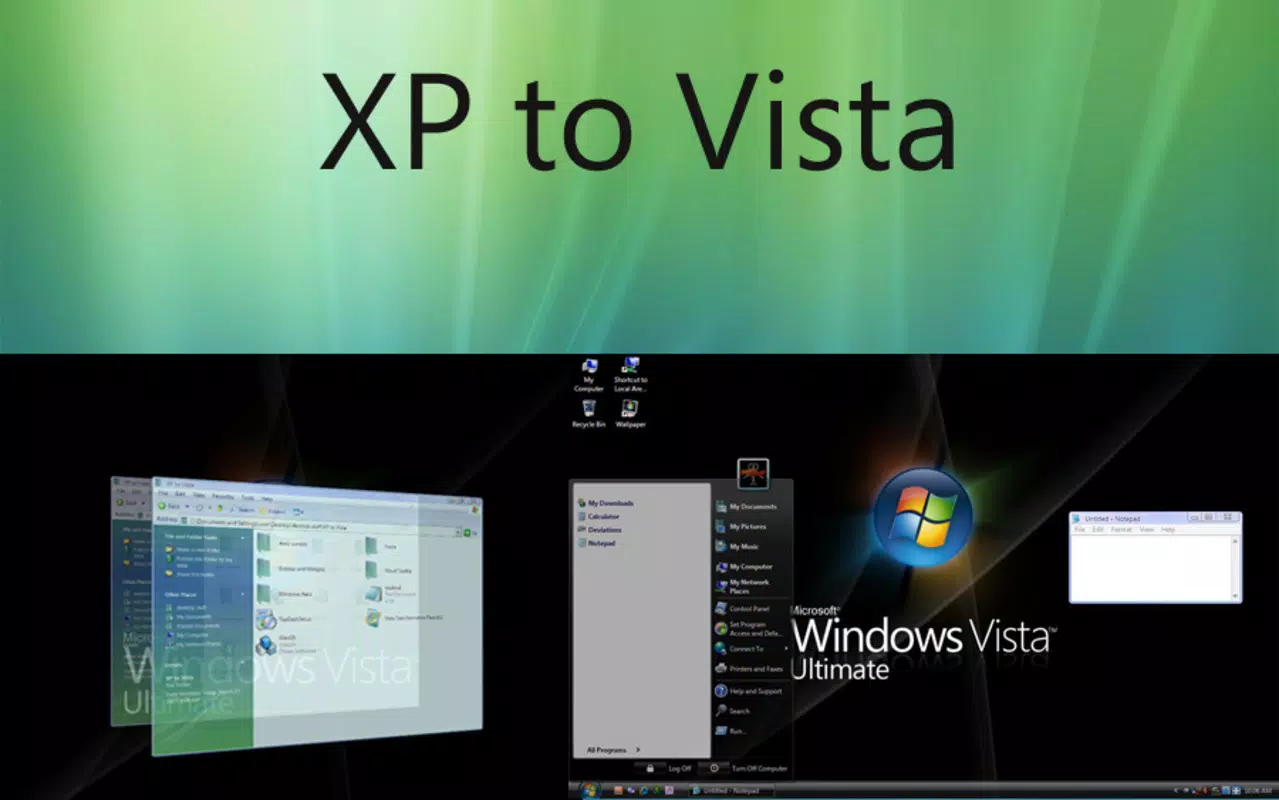

Download XP to Vista – Windows XP, Windows Vista, desktop enhancement, visual upgrade, free tool, system improvement, utility software, aesthetic transformation
Overview
XP to Vista is a utility software designed to modernize the user interface of Windows XP by incorporating visual elements reminiscent of Windows Vista. This application serves as a free tool for users seeking a more contemporary desktop experience without upgrading their operating system. By transforming the look and feel of the interface, XP to Vista addresses the visual stagnation often associated with older systems, offering a refreshed aesthetic that enhances user satisfaction and interaction.
The primary purpose of XP to Vista is to provide a visual upgrade that brings transparency, updated taskbars, and dynamic widgets to Windows XP environments. It targets users who wish to maintain system stability and performance while enjoying a more polished and modern interface. This includes individuals and organizations still relying on legacy systems due to hardware limitations or software compatibility requirements.
Although the developer did not provide additional technical details, the application was released on April 30, 2008, marking a notable effort to bridge the visual gap between two major Windows versions. Its presence in the utility software ecosystem highlights the demand for lightweight, effective desktop enhancement tools that prioritize usability and system efficiency.
Key Features & Functionality
- Visual Transformation: XP to Vista introduces a Vista-like interface to Windows XP, featuring transparent windows and updated window borders. This transformation modernizes the desktop appearance, offering a sleeker and more visually engaging environment.
- Updated Taskbar and Start Menu: The application redesigns the taskbar and Start menu with a cleaner layout and enhanced functionality. This improves navigation, making it easier to access applications and manage open windows.
- Window Previews: Users gain the ability to preview open applications directly from the taskbar. This feature streamlines multitasking by allowing quick access to active programs without full window activation.
- Sidebar and Widgets: A customizable sidebar with a range of widgets is integrated into the system. These tools offer real-time information and quick access to common functions, boosting productivity and personalization.
- Resource Efficiency: Despite its visual enhancements, XP to Vista maintains low system resource consumption. It operates smoothly on older hardware, ensuring that performance is not compromised during use.
These features collectively provide a practical solution for users who want to improve their desktop experience without the need for a full OS upgrade. For example, a user managing multiple documents and applications can benefit from window previews and a reorganized taskbar, reducing time spent switching between tasks. Similarly, the sidebar widgets can serve as a centralized hub for weather, calendar, and system monitoring tools.
Interface, UX & Performance
The user interface of XP to Vista is designed around a clean, modern aesthetic that mirrors the visual language of Windows Vista. The layout emphasizes clarity and accessibility, with intuitive navigation that minimizes user learning curves. The taskbar and Start menu are restructured to align with the new design principles, promoting efficient workflow and ease of use.
Navigation within the application is straightforward, with minimal setup required to activate the visual enhancements. Users can apply the transformation with a few clicks, and the changes take effect immediately. The responsiveness of the interface is consistent across various device configurations, although the developer did not list formal performance metrics.
Although the developer did not list formal performance metrics, the application is described as resource-efficient, suggesting stable operation even on systems with limited processing power. The interface remains responsive during multitasking, and there are no reported issues with crashes or freezes. The visual effects, such as transparency and window previews, are implemented without noticeable lag, indicating a well-optimized design.
Platform Compatibility & Technical Requirements
XP to Vista is compatible with Windows operating systems, specifically designed for Windows XP environments. The application requires a file size of 10.5 MB, making it a lightweight solution suitable for older hardware. The software version is 1.0, indicating a stable release with no major updates documented since its launch in 2008.
The developer did not specify minimum OS requirements or compatibility details beyond the platform. It is assumed to run on standard Windows XP installations, but users should verify system compatibility before installation. No additional dependencies or runtime environments are mentioned, suggesting a standalone deployment.
Pros and Cons
Pros
- Free to download and use, making it accessible to a wide audience.
- Lightweight design with minimal impact on system performance.
- Provides a modern visual upgrade without requiring OS changes.
- Includes useful features like window previews and a customizable sidebar.
- Designed for ease of use with minimal setup required.
Cons
- Released in 2008, so it may lack support for newer hardware or security updates.
- Specific technical requirements were not listed by the developer.
- May not be fully compatible with all third-party applications or system modifications.
- No official updates or maintenance since its initial release.
- Limited documentation or user support available.
FAQ
Is XP to Vista safe to install on my Windows XP system?
Yes, the application is designed as a utility tool for Windows XP and does not include malicious components. However, users should ensure they download it from a trusted source to avoid potential risks.
Can I uninstall XP to Vista if I no longer want the visual changes?
Yes, the application can be uninstalled through the standard Windows Add/Remove Programs utility. The changes made to the interface can typically be reverted by removing the software.
Does XP to Vista require an internet connection to function?
No, the application operates offline once installed. It does not rely on continuous internet access for its core features.
Is XP to Vista compatible with all versions of Windows XP?
The developer did not specify compatibility details beyond the general platform. While it is intended for Windows XP, users should verify compatibility with their specific system configuration.
Are there any known issues with system stability after installing XP to Vista?
There are no documented issues related to system stability. However, since the application has not been updated since 2008, users should be aware of potential compatibility concerns with newer system updates or security patches.
Final Thoughts
XP to Vista remains a noteworthy example of utility software that successfully bridges the visual gap between two generations of Windows operating systems. Its ability to deliver a modern aesthetic without compromising system performance makes it a valuable tool for users still relying on Windows XP. While its age is evident in the lack of updates and modern support, its core functionality continues to serve its intended purpose.
For individuals seeking a free, lightweight desktop enhancement, XP to Vista offers a compelling solution. It is particularly beneficial for users who value visual appeal and usability but cannot upgrade their operating system due to hardware or software constraints.
Download XP to Vista now


